Oracle Receivables – AR Interview Questions – Technical and Functional

How many reporting currencies can be attached to Primary Set of Books?
We can have a total of 8 SOB’s (including the Primary SOB). Therefore, we can have 7 Reporting SOB.
What are Different types of transactions in AR?
There are 7 type of transactions in AR-
Invoice,
Debitmemo,
Creditmemo,
Chargeback,
Deposits,
Guarenty, and
Bills Recivable.
What is the use of lockboxes?
AutoLockbox (or Lockbox) is a service that commercial banks offer corporate customers to enable them to outsource their accounts receivable payment processing. An AutoLockbox operation can process millions of transactions a month. AutoLockbox eliminates manual data entry by automatically processing receipts that are sent directly to your bank. You specify how you want this information transmitted and Receivables ensures that the data is valid before creating QuickCash receipt batches.Steps for lock box are :
1. The first step involves reading and formatting data from your bank file into AutoLockbox tables.
2. The second step involves submitting the validation program which checks data in the AutoLockbox tables for compatibility with Receivables.
3. Once data is validated, it is transferred into QuickCash tables. At this point, you can optionally query your receipts in the QuickCash window and change how they will be applied before submitting the final step,
4. Post QuickCash. Submitting Post QuickCash updates your customer’s balances.
What are the interface tables used for AR invoices for conversion process?
Customer interface tables:
Ra_customer_interface
ra_contant_phones_interface
ra_customer_banks_interface
ra_customer_profiles_interface
ra_cust_pay_method_interface
Invoice interface tables:
ra_interface_lines_all
ra_interface_sales_credits
ra_interface_distributions
Following are the Validation for Autoinvoice:
1- AR Transaction Type Validation : Check if the Transaction type provided in data file is defined in AR transaction types(RA_CUST_TRX_TYPES_ALL)
2- Transaction Batch Source Validation: Check if the source provided in data file is defined in AR transaction Batch source (RA_BATCH_SOURCES_ALL).
3- Invoice Currency Validation: Check if the currency provided in data file is defined in AR Currency (FND_CURRENCIES).
4- Customer Validation: Check if the Bill to Customer Number, Ship to Customer Number, Bill to Custom Location, Ship to Customer Location provided in the data file is defined in AR Customer(ra_customers).
5- Primary Sales Representative Validation: Sales representative number to be hardcode to “-3” for “No Sales Credit.”
6- Term Name : Check if the Term name provided in the data file is defined in Payment terms (RA_TERMS)
7- Validate Sales Credit Type : Sales Credit to hardcode to “Quota Sales Credit”
8- Inventory Item Validation: Check if the Item provided in data file is defined in Inventory Items (MTL_SYSTEM_ITEMS).
9- Unit of Measurement validation: Check if the UOM provided is defined in MTL_UNITS_OF_MEASURE Table
10- Invoice Tax Code Validation : Check if the Tax Code provided in data file is defined in AR_VAT_TAX_ALL_B Table.
11- Invoice GL Date Validation : Check if the GL Data of provided invoices is in open period.Used ARP_UTIL.IS_GL_DATE_VALID API to validate.
Following are the base tables
hz_parties
hz_cust_accounts
hz_cust_acct_sites_all
hz_cust_sit_use_all
hz_party_sites
hz_locations
hz_party_site_uses
hz_customer_profiles
hz_organization_profiles
hz_person_profiles
What is Auto Invoicing? Explain?
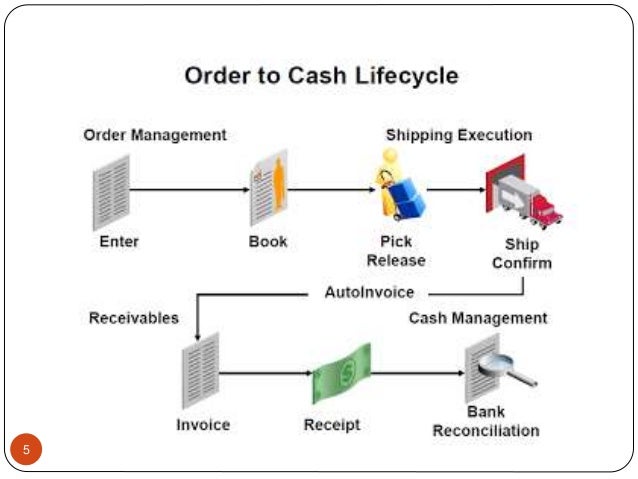
Auto Invoicing is a process of Importing Invoice related information from External / Internal Sources.External will be your business Legacy Systems like Main Frame / AS400 or Non Oracle ERP systems like SAP / JDE or From Custom Oracle Applications. The data is placed into Interface tables and from there either from Application or from PL/SQL , you can call Auto Invoice Concurrent request to validate and transfer data into AR Transaction tables. The data from these tables can be seen when queries from Transaction Screens. Auto Invoicing is a process of creating an invoice automatically in AR when a sales order has been shipped and closed. This process is triggered by a concurrent request ‘AUTO INVOICE MASTER PROGRAM’. Auto invoicing is used to import the AR invoices direclty into the AR module.
What is AUTO Accounting what are the steps for setting up auto accounting?
Auto Accounting is a mechnism for generating defualt accounting flexfields for revenue , receivables, frieght and tax based on the other parameters associated with the invoice you are entering.. since auto accounting looks at the following tables to get the data so please set/define the following depending upon your requirement.
1.Salesrep.
2.Transaction Types.
3.Standard Lines.
4.Taxes.
5.Customer bill-to-site
Receivables uses the Auto Accounting rules to determine the GL Accounts that you Enter manually or import using Auto invoice. Receivables creates the Default accounts for the Receivable, revenue, Freight, Tax, Unerned revenue, Finance charges, Unbilled receivables, Bills receivables, and Auto invoice Clearing Accoutns.You need to define these accoutns before you start entering the transactions in AR. However, you can overide these accounts during the Transaction Entry in AR.Setup Autoaccounting:AR>Setup>Transactions>AutoAccountingSelect the Type of the accoutn you wish to define the auto accoutning.In the Segments Block:Choose the segment for which you wish to assign the Auto accounting.Choose the Table Name : Sales Rep, Trxn Type, Site, Std Lines.If you wish to use a Default Constant value, then enter the value in the Constant Field.
What are the standard concurent programs for auto invoice interface and customer interfaces?
Autoinvoice Import Program — for auto invoice program
Customer Interface Master Conc Program –> for Customer InterfaceAR Complete Cycle (hoping that GL is already implemented)Define Transaction SetupsDefine Receipt and Receipt Application SetupsDefine CustomerCreate an InvoiceCreate a ReceiptApply Receipt to InvoiceReview Customer balances (Collections). The BASIC process of Receivables involves the following:1. Creation of Customer Invoices. 3. Remittance fo the same to the bank.
How do we segregate debit & credit transactions in Receivables and where we will do it?
Basically the debit and credit transaction are classified by the transaction class.
Whether we are defining customer in AR? If it is in AR then how are we placing the order and how the shipment will be done?
Customers and the associated information is stored in TCA structure, which is shared across All oracle application modules. If you add a customer in AR, it gets stored TCA underlying tables. When you want to create an Order in Order Management, the customer LOV displays data from Record Group that is created on TCA tables.
The basic Oracle ERP data model is the single Data model shared (integrated) by multiple application. The owner of the creation of customer is the AR schema and is shared by other application such as OM. These are usually called as shared entities (Supplier,Partners,Items etc)
How To Close Periods In AR?
After raising transactions and receiving the RECEIPT amount, transfer the all TRANSATIONS and RECEIPTS to the GENERAL LEDGER. And then only close the PERIOD in AR.

Explain about Party and Customer in AR?
Party could be a person or an organization which has no business relation with your entreprise, if you establish a sales relation with a department in a party then that particular department is your customer.
Thanks – Shivmohan Purohit
You can stay in touch using different Social Media channels – https://know-oracle.com/2020/02/07/join-knoworacle-on-different-social-media-channels/
